Tracking issues with Emacs and Org mode dynamic blocks
I use Org mode for literally everything, including $DAYJOB projects. To be able to effectively work with different tools your company utilizes, you need to have some sort of integration with those tools. Of course every integration you add comes with some level of maintenance burden, so keeping them scoped is quite important. Other than scope, one other thing you need to take care is the flexibility of the integration. Does it restrict you to certain workflows or does it blend with your already-existing workflow?
For Emacs itself, there are really good integrations to deal with Jira that may fill this gap: just search for emacs jira and you'll be greeted with a lot of different packages.11jira.el looks very featureful and active but I haven't tried it yet. While these are really good, what they essentially do is to bring Jira into an Emacs buffer. That alone provides a lot of value but I want a more precise way to track Jira issues/projects within my notes without introducing an elaborate hierarchy or a new system to learn. Something with small scope but with high return value due to being able to integrate with our existing note system. Specifically, I want an Org integration, not just an Emacs interface.
In this post, I'll try to describe how I fill this gap myself in Org mode using dynamic blocks with a bit of glue code.22Also see my earlier post about custom Org src blocks where I talk about a similar idea that you utilize Org mode to keep things in Emacs. With this, you'll be able to see what's happening in Jira within your notes and you'll get notified about the changes. I believe dynamic blocks are quite effective for providing bespoke integrations with other tools. They let you bring external information into Org with whatever structure you want. Even if you are not interested in Jira issues, learning about dynamic blocks may provide some value.
Idea
See this:
#+begin: jira :issues (YZ-1459 YZ-1460 XY-1461) :progress? t :target 100
#+end:
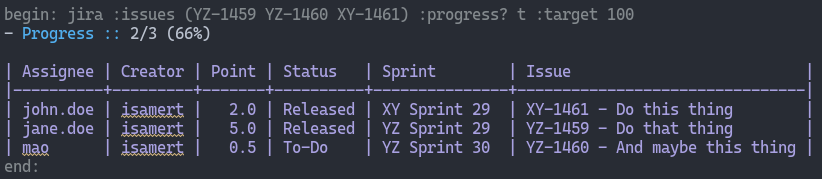
Here we have a simple custom Org dynamic block named jira. You can pass a parameter called :issues to that and upon calling this block (by hitting C-c C-c while your cursor is on the block), it'll create a table, showing a summary of these issues:
#+begin: jira :issues (YZ-1459 YZ-1460 XY-1461) :progress? t :target 100
- Progress :: 2/3 (66%)

| Assignee | Creator | Points | Status   | Sprint        | Issue                          |
|----------+---------+--------+----------+---------------+--------------------------------|
| john.doe | isamert |    2.0 | Released | XY Sprint 29  | XY-1461 - Do this thing        |
| jane.doe | isamert |    5.0 | Released | YZ Sprint 29  | YZ-1459 - Do that thing        |
| mao      | isamert |    0.5 | To-Do    | YZ Sprint 30  | YZ-1460 - And maybe this thing |
#+end:
Instead of listing issues explicitly, we can use a JQL query:
#+begin: jira :jql "...a JQL returning these issues..." :progress? t :target 100
#+end:
And here is a screenshot of what I see in a real Emacs buffer, to give you a more concrete idea:
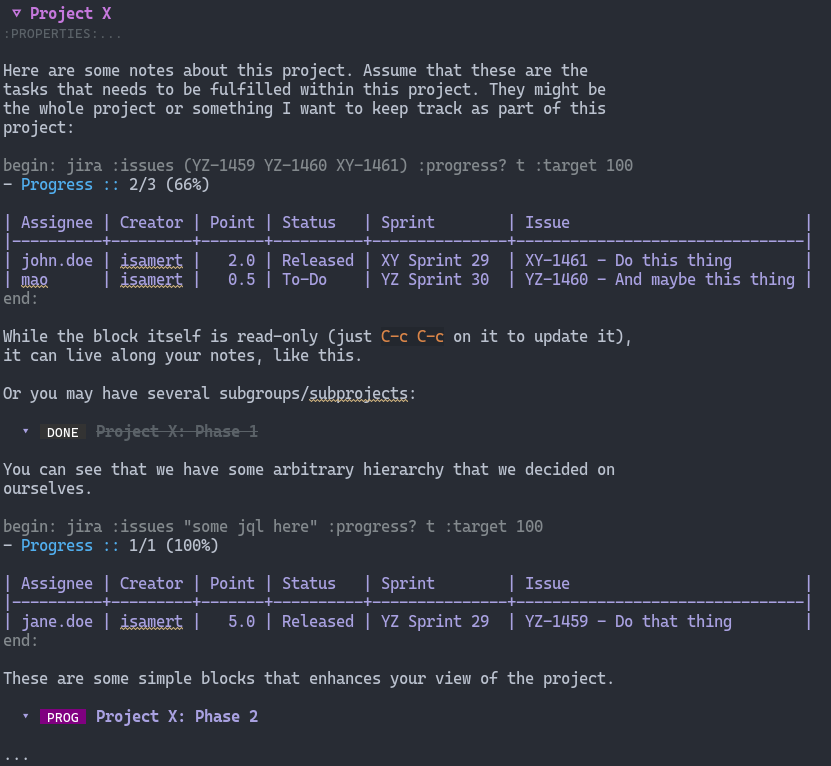
This is already useful on its own. You can logically group some issues, take notes about them under an Org heading and also see their statuses live right in the buffer. Bonus points for displaying the issue details within Emacs. This is exactly what I do when tracking large projects:
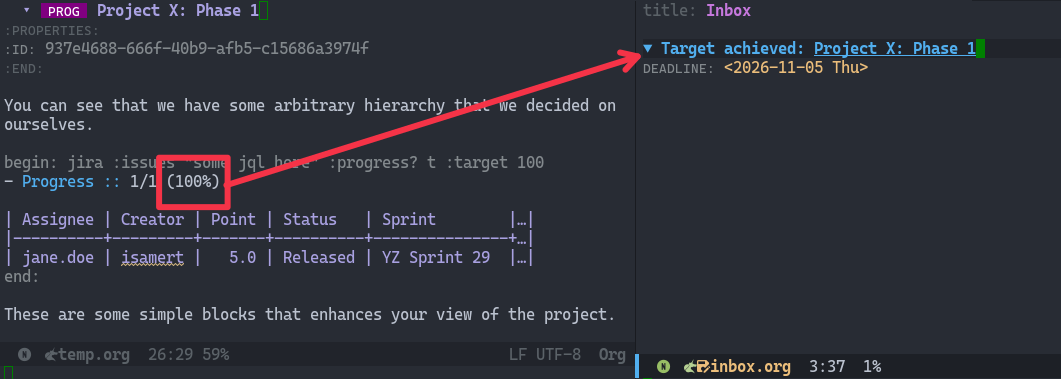
The remaining parameter is :target. This is what I use to automatically track these issue groups. Every day, a simple Cron job runs on my computer, goes through all the jira dynamic blocks that contain a :target parameter, updates these blocks and if the target is met for that particular block it creates a new entry in my inbox to let me know that I need to act on these.33In practice, I don't use a cron job but it's a simpler example to understand what's going on. In reality I do the following: I have a checklist that I go over every single day and in there I have a step to run this update function. See this post about the extended version of the daily checklist idea. Here is what happens briefly:
The useful part here is that these issue groups don't need to correspond to an epic, a sprint, or even a single team's work. One block might represent everything needed for a rollout, another an initiative spanning several teams etc. This way you can take your notes in whatever way you want and attach a simple interactive view along with them. By adding another parameter (:target), you also get notifications for free.
Implementation
(If you don't want to be bothered by the implementation details, skip to the Package section below but I highly recommend tailoring the implementation for your needs.)
Dynamic block implementation
To introduce a new dynamic block (a dblock) in Org, all you have to do is implement a function called org-dblock-write:<your-dblock-name>. For jira, that looks like this:
(defun org-dblock-write:jira (params)
  "Insert a Jira summary table using :issues or :jql from PARAMS.
With :progress? t, also show the percentage of Done or Released issues.
There is also :target parameter, which is not used here but utilized by
the notification function."
  (when (and (plist-get params :target) (not (plist-get params :progress?)))
    (user-error "Jira target tracking requires :progress? t"))
  (let* ((issues (plist-get params :issues))
         (jql (if issues
                  (format "key IN (%s)" (mapconcat #'symbol-name issues ", "))
                (plist-get params :jql)))
         (results (if jql
                      (jiralib2-jql-search jql)
                    (user-error "Specify :issues or :jql")))
         (total (length results))
         (done 0))
    (dolist (issue results)
      (when (member (let-alist issue .fields.status.name) '("Released" "Done"))
        (setq done (1+ done))))
    (when (plist-get params :progress?)
      (insert (format "- Progress :: %s/%s (%s%%)\n\n"
                      done total (if (> total 0) (/ (* 100 done) total) 0))))
    (insert "| Assignee | Creator | Points | Status | Sprint | Issue |\n|-\n")
    (dolist (issue results)
      (let-alist issue
        (let* ((sprint (or (car (alist-get im-jira-sprint-field-name .fields)) ""))
               (sprint-name (when (string-match "name=\\([^,]+\\)," sprint)
                              (match-string 1 sprint))))
          (insert
           (format "| %s | %s | %s | %s | %s | %s - %s |\n"
                   .fields.assignee.name
                   .fields.creator.name
                   (alist-get im-jira-story-points-field-name .fields)
                   .fields.status.name
                   (or sprint-name "")
                   .key .fields.summary)))))
    (org-table-align)))
Quite simple. We simply construct a JQL, request the result via jiralib2 and then print that out in the Org document and let org-table-align align the table instead of manually trying to align the table.
Here there are two variables that need attention, you can either directly change them in the function to what your Jira instance uses44You can also remove the relevant parts if you don’t want this information in your Jira dblocks., or here I'll introduce two defcustom forms to keep things package-like:
(defcustom im-jira-story-points-field-name 'customfield_10002
  "Field symbol for story points in Jira issue responses."
  :type 'symbol
  :group 'im-jira)

(defcustom im-jira-sprint-field-name 'customfield_10004
  "Field symbol for sprints in Jira issue responses."
  :type 'symbol
  :group 'im-jira)
That’s it for the dynamic block itself. Of course, it requires jiralib2, which you can configure as follows:
(use-package jiralib2
  :custom
  (jiralib2-url "<your-jira-url>")
  (jiralib2-user-login-name "<your-jira-login>")
  (jiralib2-auth 'token) ; or check the variable's documentation to see your other options
  (jiralib2-token "<your-jira-token>"))
Now you can create dynamic blocks in your Org documents:
#+begin: jira :issues (A-1 B-2 C-3) :progress? t
#+end:
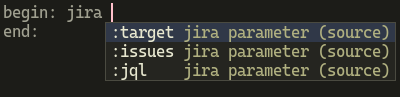
Then hit C-c C-c to retrieve the issues. If you ever forget which parameters are available, corg.el55This is just another small package I wrote. It provides auto-completion for dynamic blocks and source block headers in Org. Check it out. can help with that:
Getting notified automatically
Next, I’ll define a function that scans your Org files for jira blocks with a :target parameter. It refreshes each block and sends a notification if the target has been reached:
(defun im-jira-check-tracked-issue-groups ()
  "Refresh Jira blocks with :target in `im-jira-files'."
  (interactive)
  (dolist (file im-jira-files)
    (with-current-buffer (find-file-noselect file)
      (org-map-dblocks
       (lambda ()
         (looking-at org-dblock-start-re)
         (let* ((name (match-string 1))
                (params (read (concat "(" (match-string 3) ")")))
                (target (plist-get params :target)))
           (when (and (equal name "jira")
                      target
                      (not (org-entry-is-done-p)))
             (let ((id (org-id-get-create))
                   (heading (org-get-heading t t t t)))
               (org-dblock-update)
               (let ((end (save-excursion
                            (re-search-forward org-dblock-end-re nil t))))
                 (when (and (re-search-forward
                             "- Progress :: .*?([ \t]*\\([0-9]+\\)%[ \t]*)"
                             end t)
                            (>= (string-to-number (match-string 1)) target))
                   (im-jira--notify id heading))))))))
      (save-buffer)))
  (org-id-locations-save))
There’s one more variable to configure:
(defcustom im-jira-files (list (expand-file-name "projects.org" org-directory))
  "Org files containing Jira dynamic blocks to check for achieved targets."
  :type '(repeat file)
  :group 'im-jira)
And here is the im-jira--notify function, which is called whenever a tracked issue group reaches its target:
(defun im-jira--notify (id heading)
  "Add a reminder for ID and HEADING unless one already exists."
  (let ((already-notified?
         ;; Check whether this notification is already in the inbox file...
         (with-current-buffer (find-file-noselect im-jira-inbox-file)
           (org-with-wide-buffer
            (goto-char (point-min))
            (re-search-forward
             (concat "^\\* .*" (regexp-quote (format "[[id:%s]" id)))
             nil t)))))
    ;; ...if not, insert it via org-capture's help (so that we don't
    ;; manually edit the file and let org-capture handle the editing)
    (unless already-notified?
      (let ((org-capture-templates
             `(("j" "Jira target" entry
                (file ,im-jira-inbox-file)
                ,(format
                  "* TODO [#A] Target achieved: [[id:%s][%s]]\nDEADLINE: %s\n"
                  id heading (format-time-string "<%Y-%m-%d %a>"))
                :prepend t
                :immediate-finish t
                :empty-lines 1))))
        (org-capture nil "j")))))
This also needs one customization:
(defcustom im-jira-inbox-file (expand-file-name "inbox.org" org-directory)
  "Org file where achieved-target reminders are inserted."
  :type 'file
  :group 'im-jira)
Basically when a given jira block reaches its target, it inserts a new TODO item into your inbox file, which contains a link to the heading containing that jira block. Of course you need to run the function im-jira-check-tracked-issue-groups manually from time to time (or automatically with cron or an Emacs timer66Check out run-with-timer or run-with-idle-timer if you want to keep this in your Emacs configuration.). The notification function also checks for duplicates so you don't get bombarded with Target achieved entries in your inbox.
You can also change how the notification function (im-jira--notify) works to adjust it to your workflow. I was already using inbox.org style notes. You can, for example, make it send you a system notification too.
After I run the function, it detects an issue group meeting its target and adds a TODO item to my inbox linking to the enclosing heading of that particular issue group.
Package
Here is the full code, in a package format. Drop it into your load path and see its commentary section for configuration instructions.
;;; im-jira.el --- Simple Org Jira companion  -*- lexical-binding: t; -*-

;; Copyright (C) 2026 Isa Mert Gurbuz

;; Author: Isa Mert Gurbuz <isamertgurbuz@gmail.com>
;; URL: https://github.com/isamert/dotfiles
;; Version: 0.0.1
;; Package-Requires: ((emacs "27.1") (jiralib2 "1.0"))

;; This file is not part of GNU Emacs.

;; This program is free software; you can redistribute it and/or modify
;; it under the terms of the GNU General Public License as published by
;; the Free Software Foundation, either version 3 of the License, or
;; (at your option) any later version.

;; This program is distributed in the hope that it will be useful,
;; but WITHOUT ANY WARRANTY; without even the implied warranty of
;; MERCHANTABILITY or FITNESS FOR A PARTICULAR PURPOSE.  See the
;; GNU General Public License for more details.

;; You should have received a copy of the GNU General Public License
;; along with this program.  If not, see <http://www.gnu.org/licenses/>.

;;; Commentary:

;; Configure Jira authentication using jiralib2, then customize the
;; options below for your Org files and Jira instance.
;;
;;   (use-package jiralib2
;;     :custom
;;     (jiralib2-url "<your-jira-url>")
;;     (jiralib2-user-login-name "<your-jira-login>")
;;     (jiralib2-auth 'token) ; or check the variable's documentation to see your other options
;;     (jiralib2-token "<your-jira-token>"))
;;
;; Example usage:
;;
;;   #+begin: jira :issues (AA-1 BB-2) :progress? t :target 100
;;   #+end:
;;
;; Run `im-jira-check-tracked-issue-groups' for reminders.

;;; Code:

(require 'org)
(require 'org-id)
(require 'org-table)
(require 'let-alist)
(require 'jiralib2)

;;;; Customization

(defgroup im-jira nil
  "Settings for `im-jira'.")

(defcustom im-jira-story-points-field-name 'customfield_10002
  "Field symbol for story points in Jira issue responses."
  :type 'symbol
  :group 'im-jira)

(defcustom im-jira-sprint-field-name 'customfield_10004
  "Field symbol for sprints in Jira issue responses."
  :type 'symbol
  :group 'im-jira)

(defcustom im-jira-inbox-file (expand-file-name "inbox.org" org-directory)
  "Org file where achieved-target reminders are inserted."
  :type 'file
  :group 'im-jira)

(defcustom im-jira-files (list (expand-file-name "projects.org" org-directory))
  "Org files containing Jira dynamic blocks to check for achieved targets."
  :type '(repeat file)
  :group 'im-jira)

;;;; Main

;;;;; Org dynamic block integration

(defun org-dblock-write:jira (params)
  "Insert a Jira summary table using :issues or :jql from PARAMS.
With :progress? t, also show the percentage of Done or Released issues.
There is also :target parameter, which is not used here but utilized by
the notification function."
  (when (and (plist-get params :target) (not (plist-get params :progress?)))
    (user-error "Jira target tracking requires :progress? t"))
  (let* ((issues (plist-get params :issues))
         (jql (if issues
                  (format "key IN (%s)" (mapconcat #'symbol-name issues ", "))
                (plist-get params :jql)))
         (results (if jql
                      (jiralib2-jql-search jql)
                    (user-error "Specify :issues or :jql")))
         (total (length results))
         (done 0))
    (dolist (issue results)
      (when (member (let-alist issue .fields.status.name) '("Released" "Done"))
        (setq done (1+ done))))
    (when (plist-get params :progress?)
      (insert (format "- Progress :: %s/%s (%s%%)\n\n"
                      done total (if (> total 0) (/ (* 100 done) total) 0))))
    (insert "| Assignee | Creator | Points | Status | Sprint | Issue |\n|-\n")
    (dolist (issue results)
      (let-alist issue
        (let* ((sprint (or (car (alist-get im-jira-sprint-field-name .fields)) ""))
               (sprint-name (when (string-match "name=\\([^,]+\\)," sprint)
                              (match-string 1 sprint))))
          (insert
           (format "| %s | %s | %s | %s | %s | %s - %s |\n"
                   .fields.assignee.name
                   .fields.creator.name
                   (alist-get im-jira-story-points-field-name .fields)
                   .fields.status.name
                   (or sprint-name "")
                   .key .fields.summary)))))
    (org-table-align)))

;;;;; Dynamic block tracking

(defun im-jira-check-tracked-issue-groups ()
  "Refresh Jira blocks with :target in `im-jira-files'."
  (interactive)
  (dolist (file im-jira-files)
    (with-current-buffer (find-file-noselect file)
      (org-map-dblocks
       (lambda ()
         (looking-at org-dblock-start-re)
         (let* ((name (match-string 1))
                (params (read (concat "(" (match-string 3) ")")))
                (target (plist-get params :target)))
           (when (and (equal name "jira")
                      target
                      (not (org-entry-is-done-p)))
             (let ((id (org-id-get-create))
                   (heading (org-get-heading t t t t)))
               (org-dblock-update)
               (let ((end (save-excursion
                            (re-search-forward org-dblock-end-re nil t))))
                 (when (and (re-search-forward
                             "- Progress :: .*?([ \t]*\\([0-9]+\\)%[ \t]*)"
                             end t)
                            (>= (string-to-number (match-string 1)) target))
                   (im-jira--notify id heading))))))))
      (save-buffer)))
  (org-id-locations-save))

(defun im-jira--notify (id heading)
  "Add a reminder for ID and HEADING unless one already exists."
  (let ((already-notified?
         (with-current-buffer (find-file-noselect im-jira-inbox-file)
           (org-with-wide-buffer
            (goto-char (point-min))
            (re-search-forward
             (concat "^\\* .*" (regexp-quote (format "[[id:%s]" id)))
             nil t)))))
    (unless already-notified?
      (let ((org-capture-templates
             `(("j" "Jira target" entry
                (file ,im-jira-inbox-file)
                ,(format
                  "* TODO [#A] Target achieved: [[id:%s][%s]]\nDEADLINE: %s\n"
                  id heading (format-time-string "<%Y-%m-%d %a>"))
                :prepend t
                :immediate-finish t
                :empty-lines 1))))
        (org-capture nil "j")))))

;;;; Footer

(provide 'im-jira)

;;; im-jira.el ends here
This code is a cleaned-up, standalone version of my Emacs Jira extensions that can be found here. You probably can’t use the version from my dotfiles as a drop-in package but it might be worth taking a look for other ideas for similar integrations.
Conclusion
Org is quite extendible and dynamic blocks are just another way to extend it. I have been using another dynamic block implementation which simply does a regexp search within a given project and tabulates the matches just like these Jira issues. While it's quite easy to do a simple project-wide regexp search in Emacs already, the provided value here is that having them within your notes and it gives you some sort of overview. You can plan, brainstorm or whatever without even opening the project itself, just staying in your notes. Combined with other dynamic blocks, links, source blocks etc. the gained value is immeasurable. It's fun too! You organize your work in your notes around what matters to you, rather than third-party tools restrictions.
Of course the idea of tracking Jira issues can be extended to other platforms, I also use a similar implementation for GitHub issues.77I know it's a monstrosity but that's the point. Just implement one for your own needs and don't look back.